Feature params
Mongo Filter
filter is a query that is used for the dataset pre-filtering.
Faas uses mongo query syntax, so check out mongo query tutorial and query operators reference.
In this example, only documents that have field price less than 145000.0
will be aggregated:
More complex filter example:
config = {
    ...
    'filter': {
        'price': {'$ne': null},
        'rooms': {'$gte': 10},
        'area': {'$nin': [null, NaN, '']},
        'address': {'$regex': ".*London.*"},
    }
}
You can set a runtime filter, i.e. filter that depends on the calculated point.
This filter throws out the dataset points that have id == point.id:
Aggregation
Supported aggregation functions:
sum— sum of values;min— minimum value;max— maximum value;mean— average value;median- median value;count— number of values;nunique- number of unique values.
Note: for count and nunique aggregations, the default features fillna is 0.
Metrics
Поддерживаемые метрики:
dist— straight line distance, mfoot— walking time, minfoot_dist— walking distance, mcar_in— driving time to the point, mincar_out— driving time from the point, mincar_in_dist— driving distance to the point, mcar_out_dist— driving distance from the point, mbike— cycling time, min
Regions
Region is set in config, default 'cis'.
Metric Functions
Metric functions are used to change the weight of aggregated values.
Example:
Let's say we are calculating the sum of apartments in a 10 minute isochrone, and there are three houses in the isochrone.
| house id | apartments | metric |
|---|---|---|
| 1 | 100 | 8 |
| 2 | 120 | 5 |
| 3 | 150 | 1 |
By default, the values are simply summed: \(100 + 120 + 150 = 370\)
Now let's imagine that we want to take into account
the houses on the edge of the isochrone with a linearly lower weight.
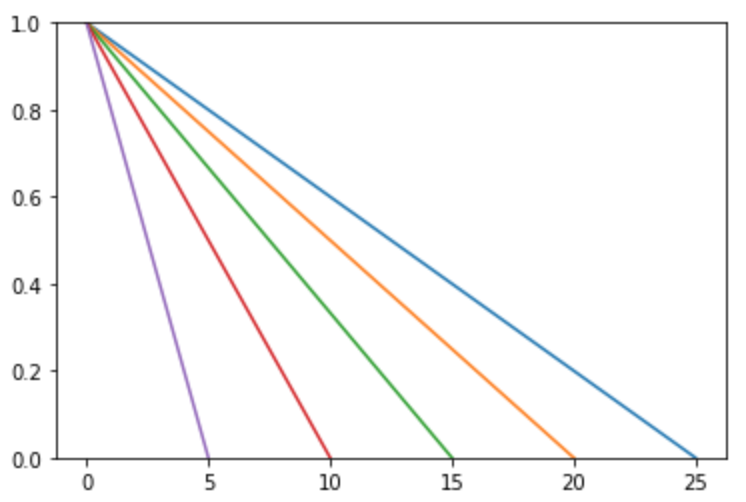
Then we should apply a linear metric function, which will set the weight
for each house depending on the distance in minutes from the calculated point.
When linear(10) is applied, the weights appear:
| house id | apartments | metric | weight |
|---|---|---|---|
| 1 | 100 | 8 | 0.2 |
| 2 | 120 | 5 | 0.5 |
| 3 | 150 | 1 | 0.9 |
And values are summed after multiplication by weights: \(0.2 * 100 + 0.5 * 120 + 0.9 * 150 = 215\)
Usually only single metric function is applied:
However, it is possible to apply several metric functions sequentially. This example is equal to \(donut(sigmoid(metric, coef, shift), limit\_from, limit\_to)\):
feature = {
    ...
    'metric_funcs': [
        {'func': 'sigmoid', 'coef': 2.0, 'shift': 1.0},
        {'func': 'donut', 'limit_from': 5, 'limit_to': 10},
    ],
}
Available metric functions (\(mt\) — metric value):
| function | weight formula | params and default values | image |
|---|---|---|---|
| linear | \(max(0, 1 - \frac{mt}{limit})\) | limit |
 |
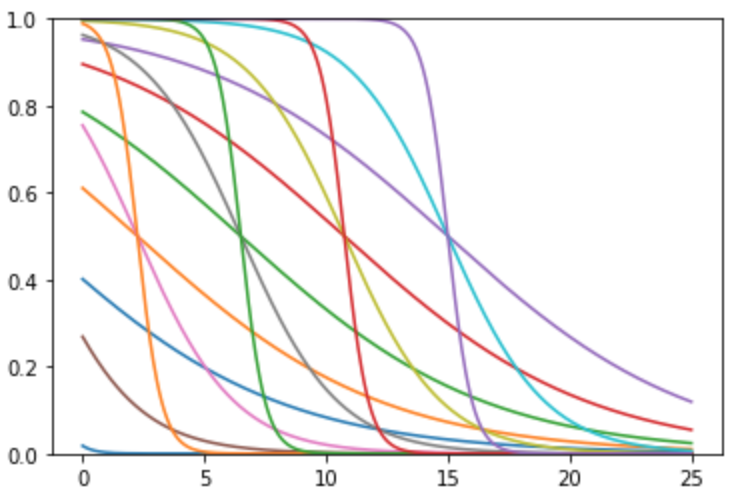
| sigmoid | \((1 - \frac{1}{1 + e^{-coef(mt - shift)}})\) | coef=1shift=0 |
 |
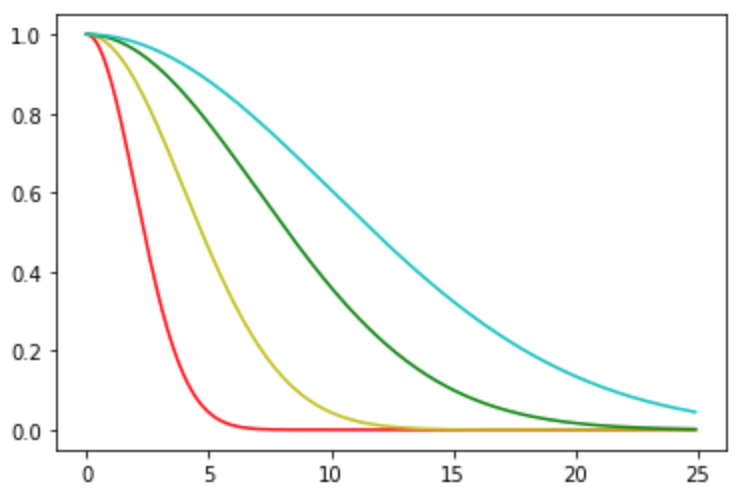
| normal | \(e^{-\frac{1}{2} (\frac{mt}{sigma})^{power}}\) | sigma=1power=2 |
 |
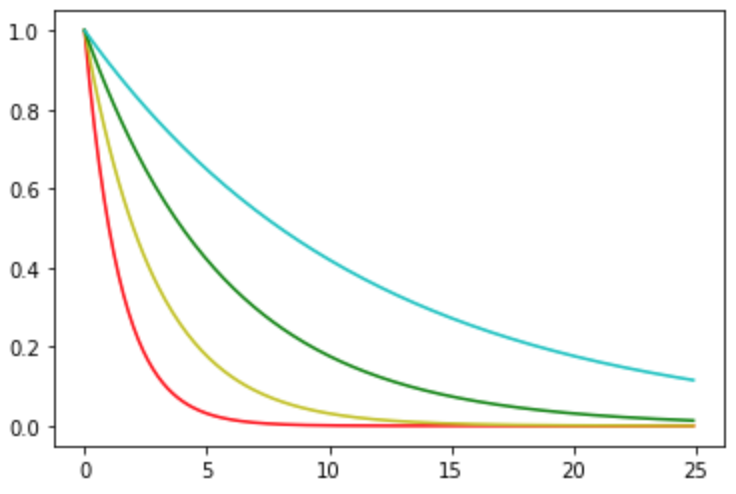
| exp | \(e^{log(\frac{1}{2}) * \frac{mt}{half\_limit}}\) \(1\) if \(mt=0\) \(\frac{1}{2}\) if \(mt=half\_limit\) |
half_limit |
 |
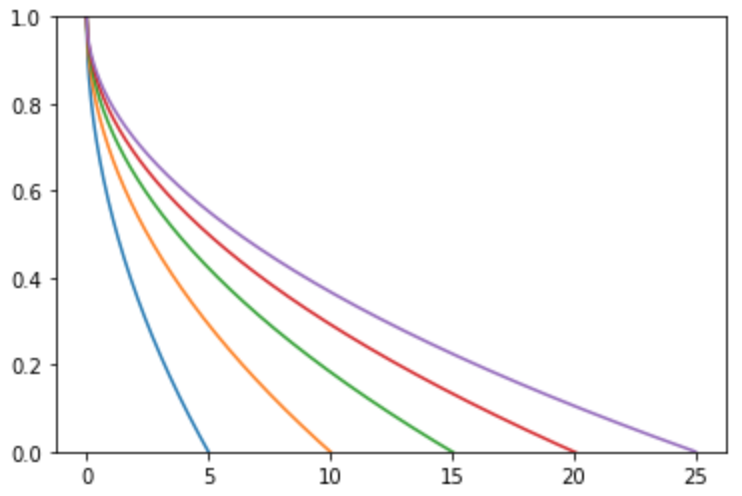
| sqrt | \(max(0, 1 - \sqrt{\frac{mt}{limit}})\) | limit |
 |
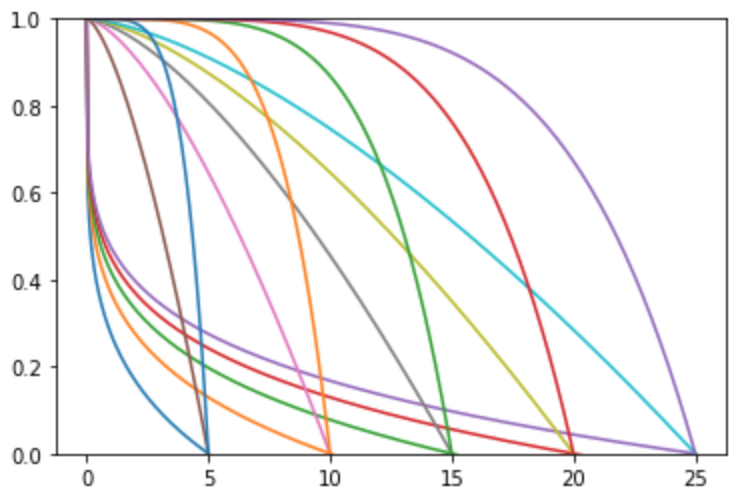
| pow | \(max(0, 1 - (\frac{mt}{limit})^{power})\) | powerlimit |
 |
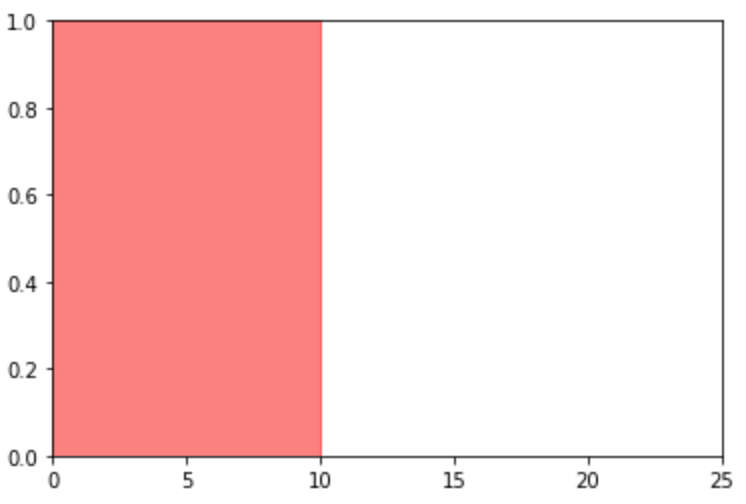
| circle | \(1\) if \(0 < mt < limit\) \(0\) otherwise |
limit |
 |
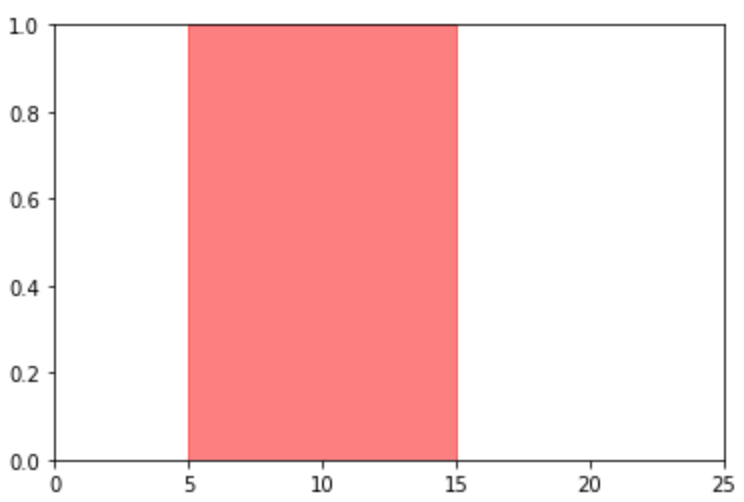
| donut | \(1\) if \(limit_{from} < mt < limit_{to}\) \(0\) otherwise |
limit_fromlimit_to=np.inf |
 |
| huffnet | \(y(x) = \frac{\sum_i y_i \cdot \exp\left( -\frac{(x - x_i)^2}{\text{scale}^2} \right)}{\sum_i \exp\left( -\frac{(x - x_i)^2}{\text{scale}^2} \right)}\) | paramslimitscale=Nonestart_from=1inverse=False |
parametrized monotonic function |
Influence Functions
The influence is the value that is used to calculate probability in huff features.
By default linear influence function is used, but you can set another in feature
config:
Available influence functions (\(mt\) — metric value, \(wt\) — weight value):
| function | influence formula | params and default values |
|---|---|---|
| linear | \(\frac{wt}{mt}\) | |
| pow | \(\frac{wt}{mt^{\frac{pow\_coef}{(1 + wt)^{weight\_pow}}}}\) | pow_coef=1weight_pow=0 |
| sigmoid | \(wt \cdot (1 - \frac{1}{1 + e^{-coef(mt - shift)}})\) | coef=1shift=0 |
| normal | \(wt \cdot e^{-\frac{1}{2} (\frac{mt}{sigma})^{power}}\) | sigma=1power=2 |
| huffnet | parametrized monotonic function \(y(x) = \frac{\sum_i y_i \cdot \exp\left( -\frac{(x - x_i)^2}{\text{scale}^2} \right)}{\sum_i \exp\left( -\frac{(x - x_i)^2}{\text{scale}^2} \right)}\) | paramslimitscale=Nonestart_from=1inverse=False |
Geometry filters
Supported geometry filters:
cross_right— take into account only those LineStrings where the point lies to the right relative to the direction of movement;cross_left— take into account only those LineStrings where the point lies to the left relative to the direction of movement;
Note: For both modifiers dataset's geometry type must be geojson LineString.
Formula instead of field
For all features instead of aggregating single field you can calculate an expression over several fields and then aggregate it.
Suppose we know area of the apartments and their price and we want to aggregate price per square meter. In that case we can use formula instead of single field:
The formula expression should use numexpr syntax.
Note: field names with spaces are not allowed.
Note: for Near feature dropna and dropzero will be applied for the
evaluated formula field.
Virtual ones
Sometimes it is useful to perform aggregation without taking into account any specific
field. For example, to calculate huff features for individual objects and aggregate
the impact of each house. For such situations, you can use the virtual field of ones.
It is denoted as _ones and can be used in formula field.
Such a field is completely equivalent to a field of ones if it were in the dataset. You can perform similar formula operations with it without restrictions.